
MINECRAFT MOVIE SKIN
Upload a photo and get a Minecraft skin in the look of the heroes of A Minecraft Movie, with your own face.
SIGN IN TO GENERATE
SIGN INYour result workspace
No skin has been generated yet
Add your reference or description, review the settings, then generate. Only your actual result will appear here.
From reference to playable skin
No verified examples to display yet
- Start with a clear reference. Choose a style and check whether your result will be public or private before submitting.
- When generation finishes, inspect the available candidates in 3D and keep one. A single usable candidate is saved automatically.
- Download the saved PNG, refine pixels in the skin editor, or open Studio for a separate AI edit.
MORE ABOUT THIS TOOL
Minecraft Movie Skin Maker: Turn Your Photo into a Movie Hero
What would you wear if you were the next hero of A Minecraft Movie? Upload a photo and our AI turns you into a playable 64x64 Minecraft skin in the look of the movie's heroes, with your own face and hair. No pixel art, no editor, ready in about a minute.
The movie gave its heroes outfits that are instantly recognisable in blocks. This style dresses you in one of those looks, while keeping your face yours, never an actor's.
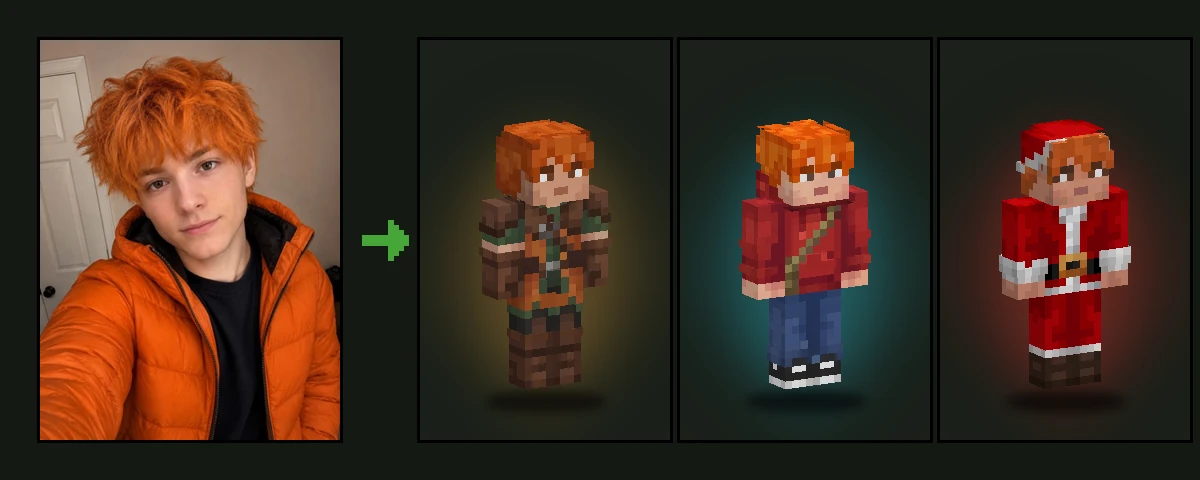
How to Make a Minecraft Movie Skin from Your Photo
- Upload a clear photo of yourself or a friend.
- Keep the Movie style selected and press Generate.
- Wait about a minute while the AI builds your movie skin.
- Spin your skin in 3D and download the 64x64 PNG.
- Load it into Minecraft Java or Bedrock and step into the Overworld.
Minecraft Movie Looks You Can Get
The AI picks the look that suits you best, inspired by the human heroes of the film:
- A teal short-sleeve shirt with relaxed blue jeans and brown boots
- A hot-pink fringed jacket over a white tee, with ripped jeans and chunky sneakers
- A red pullover hoodie with a khaki crossbody satchel
- A teal cardigan over a black tee, with a checked skirt or trousers
- A retro purple-and-orange tracksuit with a lime crossbody bag
Just like in the film, the fabrics look real, even in blocks: denim, knit, leather and nylon are shaded with several tones, so your skin has the same textured feel as the movie characters.
Your Face, Movie Style
Your face, hairstyle and hair colour are taken from your photo, and they stay fully visible. The result is a skin that looks like you walked straight out of the movie: great for recreating scenes with friends, for a movie-themed server, or for matching skins with your whole group.
A Minecraft Movie, and the Sequel in 2027
A Minecraft Movie, directed by Jared Hess, reached cinemas on April 4, 2025. It had the biggest opening weekend ever for a video game film, $162.8 million in the US alone, and went on to earn about $961 million worldwide, one of the most successful video game adaptations of all time.
The story continues in A Minecraft Movie Squared, again directed by Jared Hess and scheduled for July 23, 2027 in the US. Jason Momoa, Jack Black, Danielle Brooks, Matt Berry and Jennifer Coolidge return, and Kirsten Dunst joins the cast as Alex.
Until the sequel arrives, the best way to be part of the story is to put yourself in it: make a skin with your own face in a movie hero look and bring it to your next Minecraft session with friends.
Best Photos for a Minecraft Movie Skin
- A clear, front-facing photo in good light
- Your face and hairstyle easy to see
- Only one person in the photo
- Any clothes: the outfit is replaced with the movie look anyway
Play It in Minecraft Java and Bedrock
Every skin downloads as a standard 64x64 PNG that works in Minecraft Java Edition and Bedrock Edition. Want a different colour or an extra detail? Open it in the free Minecraft skin editor. Here is how to import a custom skin into Minecraft.
Looking for the Movie Characters Themselves?
If you want Steve, Garrett, Henry, Natalie or Dawn as they appear in the film, browse our free Minecraft Movie skins collection.
Photo2Skin is an independent fan tool and is not affiliated with Mojang Studios, Microsoft or Warner Bros.
Frequently Asked Questions
Can I turn my photo into a Minecraft Movie skin?
+
Yes. Upload a photo, keep the Movie style selected and the AI makes a playable Minecraft skin with your face in a look inspired by the heroes of A Minecraft Movie.
Will I look like an actor from the movie?
+
No. Your face and hair always come from your own photo. Only the outfit is inspired by the film.
Can I choose which movie outfit I get?
+
The AI picks the look that suits your photo best. Generate again for a different one, or change any detail afterwards in the free skin editor.
Does the skin work in Minecraft Java and Bedrock?
+
Yes. It is a standard 64x64 PNG Minecraft skin, so it works in both Java Edition and Bedrock Edition.
Do I need a full-body photo?
+
No. A selfie or a head-and-shoulders photo is enough. The AI designs the whole outfit, top to bottom.
Where can I find skins of the actual movie characters?
+
Our library has a free Minecraft Movie collection with Steve, Garrett, Henry, Natalie, Dawn and more.
When is the next Minecraft Movie coming out?
+
A Minecraft Movie Squared, the sequel to A Minecraft Movie (2025), is scheduled for July 23, 2027 in the US, directed again by Jared Hess.